

How to buy bitcoin with credit card is the most common first question from new buyers, because paying by card is the fastest way to own BTC. In most countries, you can buy Bitcoin on a reputable exchange or payment app using a Visa or Mastercard, and the BTC appears in your account within minutes.
The trade-off is cost: card purchases usually carry higher fees than bank transfers, and some banks treat crypto purchases as cash advances. This guide walks through the five steps, what it costs, what to watch for, and how to keep your BTC safe afterwards. This article is educational only and is not financial advice.
Key Takeaways How to buy bitcoin with credit card
- Yes, you can buy Bitcoin with a credit card on most major exchanges and payment apps
- You need an account, identity verification (KYC), and a Visa or Mastercard in your name
- Card purchases are fast (usually minutes) but cost more than bank transfers often 2–4% plus spread
- Some banks block crypto purchases or treat them as cash advances with extra fees and interest
- Debit cards usually cost less than credit cards for the same purchase
- After buying, move larger amounts to your own wallet exchanges are not long-term storage
- This article is educational only and is not financial advice
Before You Start: What You Need
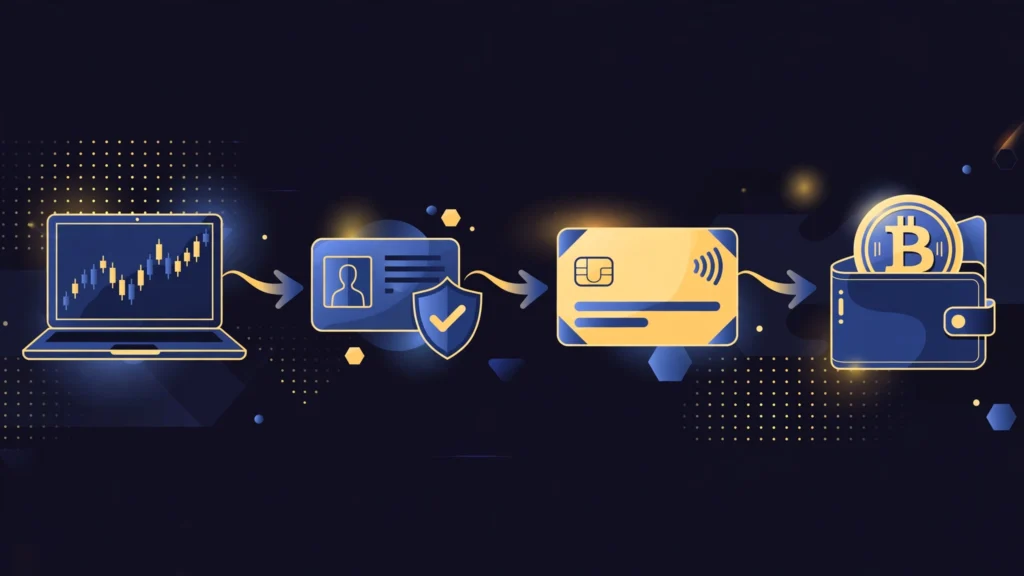
Three things before you buy. First, an account on a reputable exchange or payment app that supports card purchases in your country — availability varies by region, so check before signing up. Second, identity verification: nearly all regulated platforms require a government ID and sometimes a selfie before you can buy with a card, and verification can take minutes to a day. Third, a card in your own name — most platforms reject third-party cards.
One warning up front check with your bank first. Some banks decline crypto transactions outright, and others treat them as cash advances, which means immediate interest charges and an extra fee on top of the platform’s fee. If your bank blocks the purchase, a debit card or bank transfer is usually the cheaper fallback. The same card method also works for Ethereum see how to buy ethereum with credit card if you want to compare the two.
Choose a Platform
Pick a well-known, regulated platform with a real reputation not a random website from an ad or a social media link. Compare three things: whether it accepts cards in your country, its card fee (usually shown before you confirm), and its withdrawal options.

Major exchanges and payment apps (for example, Coinbase, BitPay, and similar services) all offer card purchases, but fees and limits differ, so a two-minute comparison can save real money. Avoid any platform that asks you to send card details over chat, email, or a messaging app legitimate platforms only take card details inside their own secure checkout.
Verify Your Identity
Complete the platform’s identity check (KYC) before you try to pay. You will typically upload a government ID and take a selfie or short video for liveness checks. This step exists because regulated platforms must follow anti-money-laundering rules, and it also protects you: a verified account is much harder for a thief to take over. Verification is usually quick, but do it before you need to buy urgently a pending check is the most common reason first purchases get delayed.
Add Your Card and Buy
Inside the platform, go to Buy, select Bitcoin (BTC), and add your card: number, expiry, and the billing address that matches your bank record. Enter the amount you want to spend start small on your first purchase to confirm everything works. Before you confirm, the platform must show you the full breakdown: the amount of BTC you will receive, the fee, and the exchange rate.
Check that breakdown, because the rate includes a spread (the platform’s margin) which is a hidden part of the cost. Confirm, and the BTC usually appears in your platform account within minutes, though first purchases can take longer while checks complete.
Understand the Fees
Card fees are the main downside of this method. Expect a card processing fee of roughly 2–4% plus the exchange-rate spread, which together can make a card purchase noticeably more expensive than a bank transfer (often under 1%).
On top of that, your card issuer may add its own charge: a cash-advance fee plus immediate interest if the purchase is classified as a cash advance, or a foreign-transaction fee if the platform bills in another currency. Read your card’s terms before a large purchase, and for bigger amounts, compare the total card cost against a bank transfer the difference is often large enough to matter.
Move Your BTC to Your Own Wallet
Once the purchase completes, decide where to keep your BTC. Small amounts for trading can stay on the platform, but larger amounts are safer in your own wallet, where you control the private keys — the well-known rule is not your keys, not your coins.
Set up a reputable software wallet (or a hardware wallet for larger holdings), copy your wallet address carefully, and send a small test amount first before moving the rest. Write down your wallet’s seed phrase on paper and store it offline; anyone with that phrase owns your BTC. Never share it with anyone, including people claiming to be support staff.
Common Problems and Fixes
Card declined? It is usually your bank blocking crypto, not the platform call the bank or try a debit card. Purchase pending? First-time buys often wait for extra verification; check your email for a confirmation request.
Wrong amount of BTC That is usually the spread and fees shown at checkout always review the breakdown before confirming. Account locked after buying Complete any pending verification steps and contact official support through the platform’s own website or app, never through a link someone sent you.
FAQs
How to buy bitcoin with credit card?
Create an account on a reputable exchange or payment app, complete identity verification, add your Visa or Mastercard, select Bitcoin, review the fee breakdown, and confirm. The BTC usually arrives in your account within minutes.
Can I buy Bitcoin with any credit card?
Most Visa and Mastercard credit cards work, but it depends on your bank and country some banks block crypto purchases, and some treat them as cash advances with extra fees and interest. A debit card is a common fallback when a credit card is declined.
How long does it take to buy Bitcoin with a credit card?
Usually minutes once your account is verified. First purchases can take longer while the platform completes extra checks, and verification itself can take minutes to a day.
Q4. What are the fees for buying Bitcoin with a credit card?
Expect roughly 2–4% in card processing fees plus the exchange-rate spread, and possibly a cash-advance fee and interest from your card issuer. Always review the full breakdown before confirming, and compare with a bank transfer for larger amounts.
Conclusion
How to buy bitcoin with credit card comes down to five steps: choose a reputable platform, verify your identity, add your card, review the full fee breakdown, and move larger amounts to your own wallet. Card buying wins on speed and convenience, and loses on cost so it is best for first purchases and small amounts, while bank transfers usually win for larger buys.
Whichever route you pick, compare the total cost, check your bank’s rules first, and keep your seed phrase offline. Buying BTC is the easy part; keeping it safe is the part that matters. And when the time comes to cash out, the reverse is just as simple see how to sell bitcoin for cash.